webCommander 4.0 Installation Using Proxy

Introduction

Finally, I found some spare time to upgrade webCommander from 2.0 to 4.0. To make this work, I first had to replace my Windows 2008 R2 to Windows 2012 R2 to upgrade PowerShell to 4.0. PowerShell could be upgraded without OS replacement but it was a good opportunity to try 2012 R2 out.

With webCommander 4.0 release, Jerry (@9whirls) has written an excellent automatic installation script (can be found here) that downloads all pre-requisites from the internet, installs IIS…etc. Since my VM was in private network that didn’t have access to outside network, I first tried it by configuring proxy connection within IE setting.
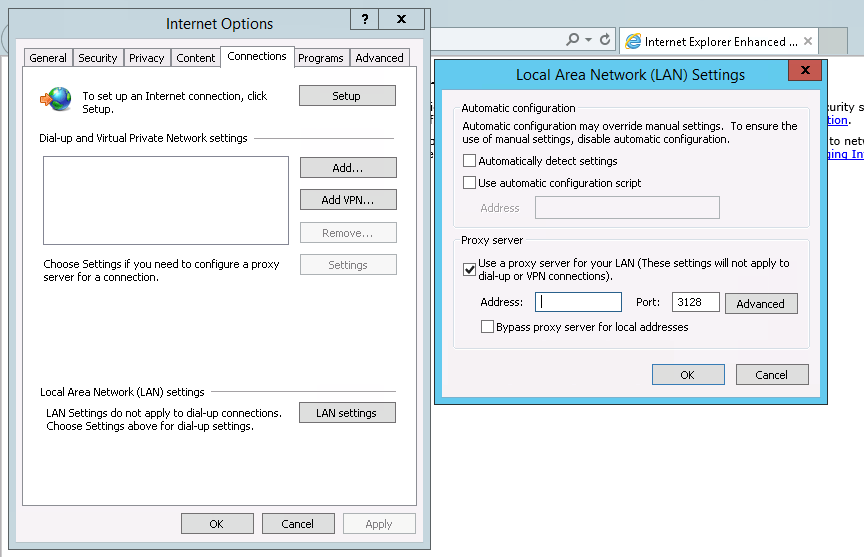
Screen Shot 2014-09-24 at 2.08.57 pm

However, got an error message when I ran the script that is attached below.

Exception calling "DownloadFile" with "2" argument(s): "The remote server returned an error: (407) Proxy
Authentication Required."
At C:\Users\administrator\Desktop\setup.ps1:66 char:2
    + $webClient.downloadfile($packageUrl, "C:\WebCommander\$packageName")
    + ~~~~~~~~~~~~~~~~~~~~~~~~~~~~~~~~~~~~~~~~~~~~~~~~~~~~~~~~~~~~~~~~~~~~
    + CategoryInfo          : NotSpecified: (:) [], ParentContainsErrorRecordException
    + FullyQualifiedErrorId : WebException

Throughout this blog post, I will aid people who’s trying to install webCommander 4.0 but the VM is in a private network that doesn’t have access to internet.

Script Modification

As the script was already using WebClient object, all I had to create was a new WebProxy object to parse the proxy IP address and credentials. In the parameter field, I added in:

  1. IP Address or hostname of the proxy server. Bear in mind, it requires the appropriate port to be specified in the end. Example is attached below.
  2. Username/password that has the access to the proxy server.

The change needs to be made are in bold and italic below.

Parameter

Param (
    $packageUrl = 'https://github.com/vmware/webcommander/archive/master.zip',
    $authentication = 'Windows',
    $adminPassword = '', # administrator password of the windows machine where webcommander is located
    $defaultPassword = '', # default password used to communicate with vSphere, VM and remote machine
    $proxyAddress = '', # IP or hostname of the proxy server. Include the port number in the end. For example, 'proxytest.test.com:3128'
    $proxyUserName = '',
    $proxyUserPassword = ''
)

Once 3 parameters were added in, used one if/else statement to ensure parameters for proxy configuration were entered in. After that, all I had to do was:

  • Define one WebProxy object with proxy server address in the parameter field.
  • Define a PSCredential object also from the parameter above.
  • Use above defined two objects information for the WebClient object.

Again, modification required are in bold and italic below.

WebClient + WebProxy

if ($proxyAddress -and $proxyUserName -and $proxyUserPassword) {
    $webClient = New-Object System.Net.WebClient
    $webProxy = New-Object System.Net.WebProxy($proxyAddress, $true)
    $proxyCredential = New-Object System.Management.Automation.PSCredential($proxyUserName, (ConvertTo-SecureString $proxyUserPassword -AsPlainText -Force))
    $webProxy.Credentials = $proxyCredential
    $webClient.Proxy = $webProxy
} else {
    $webClient = new-object system.net.webclient
}

Once the modification was made, ran the script and wallah, it worked!
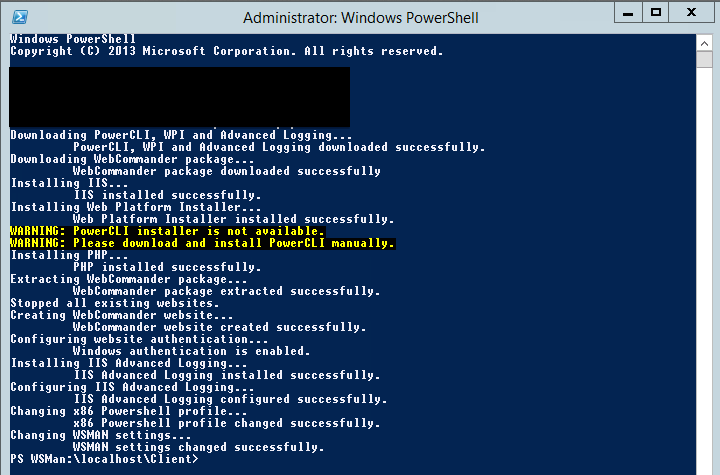
Screen Shot 2014-09-24 at 10.40.31 am

Navigated to webCommand URL and was successful.
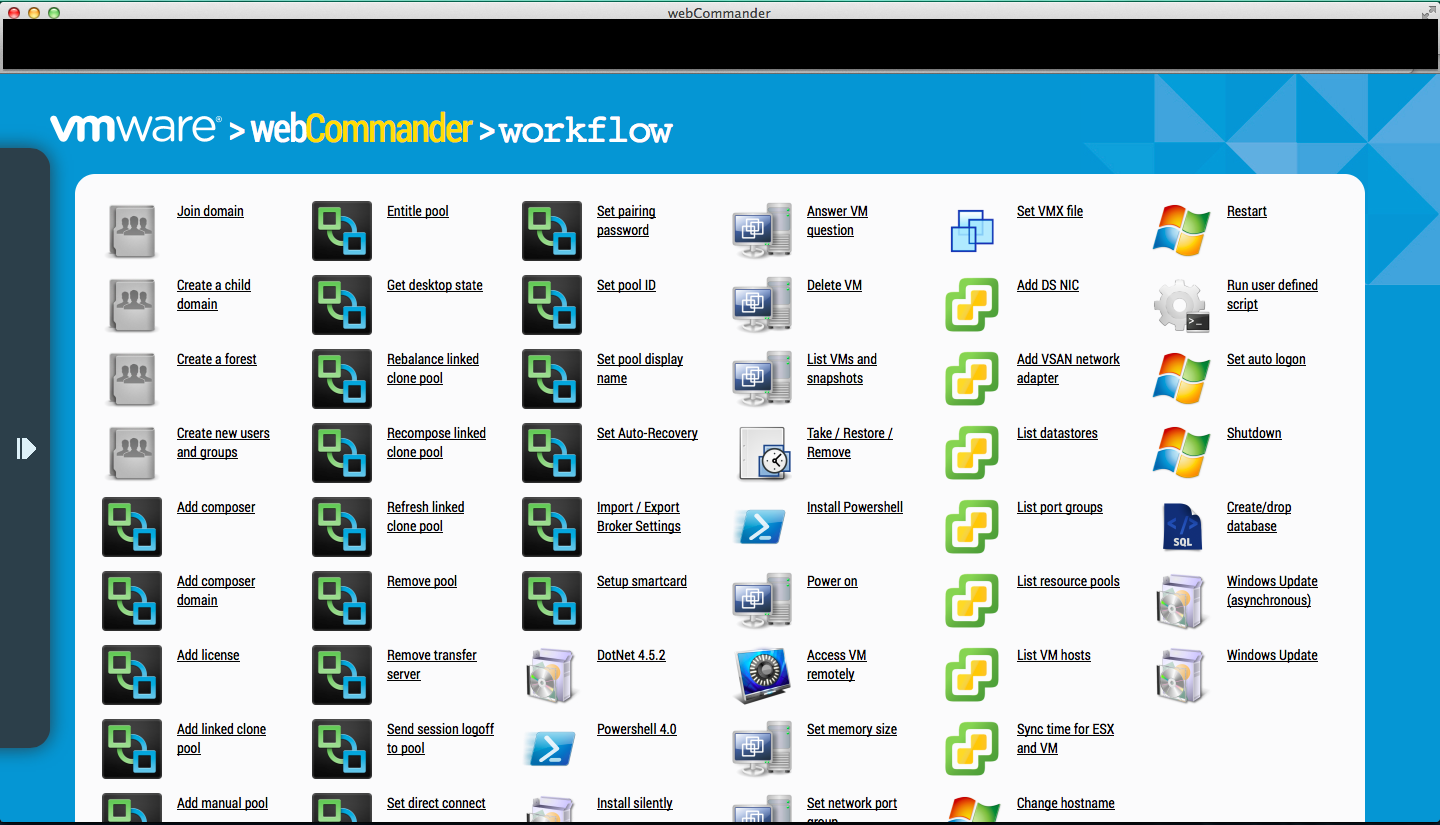
Screen Shot 2014-09-24 at 11.26.43 am

Wrap-Up

In near future, I will commit the change above so that whoever requires proxy to install webCommander wouldn’t need to make a change above.

Hope this blogs helped and always welcome to ping me for any issues or suggestions.

vMotion Issue – A Specified Parameter was not correct

Introduction

While upgrading ESXi 5.0 servers to 5.5 , I faced an issue that a bunch of virtual machines weren’t able to be vMotioned while entering maintenance mode.

In this blog post, I would like to share with you how I went through the issue and found the solution.

Symptom

Initial symptom was that whenever I execute vMotion with a several virtual machines, it stopped at 14% saying:

“A specified parameter was not correct”

Investigation

Before diving into this issue, let us be more specific. There were 4 ESXi servers all with version 5.0 no update and I will call them:

  • ESXiA
  • ESXiB
  • ESXiC
  • ESXiD

There were a number of virtual machines had this issue but I picked one virtual machine, VMA which was registered on ESXiA. With this virtual machine:

  • vMotion to ESXiC & ESXiD worked
  • vMotion to ESXiB didn’t

Re-visiting the symptom above, vMotion stopped at 14% which means that ESXiA was about to start transferring memory state and it failed.

First investigation was made on VMKernel log to figure out why memory transfer has aborted, however, it didn’t indicate anything. Next log I took a look was the hostd.log and one line I found was the following:

blog2

The error message seemed like the issue was related. But looking at this VMware KB, since the ESXi server was 5.0 with no update, this was a known issue that could have been ignored.

While looking at the virtual machine configuration, one odd thing was that the virtual machine wasn’t showing correct swapfile datastore. Since our environment uses dedicated VMFS volumes for swap files, normally, it should have shown on the summary tab:

  • datastore1
  • datastore2
  • swap_datastore1

But it didn’t show swap_datastore1. As swap file moves with virtual machine configuration files, I tried to storage vMotion configuration files to another datastore and gotcha, it started showing up all datastores correctly. However, vMotion failed again with the same error message and guess what, swap_datastore1 disappeared again. This proved that when ESXi tried to transfer swap file to another dedicated swap datastore and it failed.

Next step taken was to see what was going on with ESXi server by connecting to it directly using vSphere client. Surprisingly, there were a lot of pending jobs of:

“Register virtual machine”

blog1

Solution

To fix this problem, it was required to clear up all queued jobs on this ESXi server.

First attempt made was to cancel the jobs by

  1. right click
  2. Cancel

But the cancel was greyed out. As I wasn’t sure which service does registering virtual machine job, I restarted management services by running “services.sh restart”. The connection to ESXi server was disconnected and after logging back into it, jobs were cleared. Re-tried vMotion and the issue was fixed.

Wrap-Up

To summarise the issue and soluion:

  • vMotion stopped at 14% saying A specified parameter was not correct
  • Restarted management services on all ESXi servers to clear jobs

Surprising thing found was that the very first job queued was for more than a month (not shown on the screenshot above). I suspect that the issue happened when:

  1. Virtual machines weres being vMotioned to other ESXi servers by DRS
  2. During this, there was a storage outage that affected all swap file VMFS volumes (yes… there was one)
  3. Hence, the jobs started hanging as ESXi couldn’t find appropriate swap VMFS volumes

Hope this helps to those of you are facing the same issue.

PowerCLI – Virtual Machines Running on vDisk in Relationship, IBM SVC

Introduction

Recently, I wrote a PowerCLI script to audit which virtual machines are running on vDisks in relationship. With this report, I could correct naming convention of both VMFS volumes and vDisks and find out which VMFS volumes are not in relationship.

In this blog post, I will be going through:

  • Products Used
  • Script & Explanation
  • Sample Output

Products

The following products are used for this report:

  • PowerCLI 5.5 R2
  • IBM SVC 7.1
  • PLINK

Script

In this script, there are 4 inputs required:

  • SVC user
    • It doesn’t have to be admin as it only queries vDisk & relationship information
  • SVC user’s password
  • Master site’s IP address
  • Auxiliary site’s IP address

I am assuming that you have connected to the vCenter server. Bear in mind that you are connected to only the vCenter server that is the master site, otherwise, it won’t work.

Now, let’s go through how the script works:

  1. Call-SVC function is made in order to save SVC command output to a variable
    • This utilises PLINK to connect to SVC and query based on the command you put
    • In this case, it will use “lsvdisk” and “lsrcrelationship”
  2. Call-SVC function saves
    • Relationship list in master site
    • vDisk list in master site
    • vDisk list in auxiliary site
  3. Using the relationship list and vDisk list in master site in Step 2
    • If master vDisk is in a relationship, it concatenates it to a variable called expression
    • In the end, it becomes a regular expression.
  4. Gathers VMFS volmes by Get-Datastore
  5. Using the regular expression in step 3 i.e. $expression, it finds and saves the list of virtual machines those are running on vDisks in relationship
  6. Foreach virtual machine in the list in step 5
    • Foreach datastore this virtual machine is using
      • Saves name & size of the virtual machine
      • Saves name & capacity & UID of this datastore
      • If this datastore can be found in the master relationship list, it saves
        • Name & state of the relationship
        • Name & UID & IOG of the master vDisk
        • Name & UID & IOP of the auxiliary vDisk
      • Otherwise, put null to above
  7. Once Step 6 foreach loop is finished, save the result and output as a .csv file

Script is attached below.

$result = '' | select VM, "VM Size", VMFS, "VMFS UID", "VMFS Size", "Master vDisk", "Master UID", "Master IOG", "Aux vDisk", "Aux UID", "Aux IOG", Relationship, State

$svc_user = ""
$svc_password = ""
$master_site = ""
$aux_site = ""

## Step1
Function Call-SVC {
    param ($command,$server)
    echo y | C:\script\PLINK\plink.exe -pw $svc_password "$svc_user@$server" "$command -delim ," > temp.csv
    $output = Import-CSV C:\script\powercli\temp.csv
    Remove-Item C:\script\powercli\temp.csv
    return $output
}

## Step2
$relationship_list = Call-SVC "lsrcrelationship" $master_site
$master_vdisk_list = Call-SVC "lsvdisk" $master_site
$aux_vdisk_list = Call-SVC "lsvdisk" $aux_site

## Step3
$master_vdisk_list | Foreach-Object {
    if ($relationship_list.master_vdisk_name -contains $_.Name) {
        $expression += "|" + $_.vdisk_UID
    }
}

## Step4
$datastore = Get-Datastore -Verbose

## Step5
$vm = Get-VM -Datastore ($datastore | where {$_.ExtensionData.Info.Vmfs.Extent.DiskName -match ($expression -replace "^\|") }) -Verbose | Sort Name

## Step6
$result = foreach ($v in $vm) {
    $v.ExtensionData.Datastore.Value | ForEach-Object {
        $id = $_ -replace "[Datastore-]"
        
        $vmfs = $datastore | where { ($_.id -replace "[Datastore-]") -eq $id }

        $result."VM" = $v.Name
        $result."VM Size" = $v.ProvisionedSpaceGB
        $result."VMFS" = $vmfs.Name
        $result."VMFS Size" = $vmfs.CapacityGB
        $result."VMFS UID" = $vmfs.ExtensionData.Info.Vmfs.Extent.DiskName

        $master_vdisk = $master_vdisk_list | where {$_."vdisk_UID" -eq ($vmfs.ExtensionData.Info.Vmfs.Extent.DiskName -replace "naa.").ToUpper()}
        $relationship = $relationship_list | where {$_.master_vdisk_name -eq $master_vdisk.Name}

        if ($relationship) {    
            $aux_vdisk = $aux_vdisk_list | where {$_.Name -eq $relationship.aux_vdisk_name}

            $result."Relationship" = $relationship.Name 
            $result."Master vDisk" = $master_vdisk.Name
            $result."Master UID" = $master_vdisk.vdisk_UID
            $result."Master IOG" = $master_vdisk.IO_group_name 
            $result."Aux vDisk" = $aux_vdisk.Name
            $result."Aux UID" = $aux_vdisk.vdisk_UID
            $result."Aux IOG" = $aux_vdisk.IO_group_name 
            $result."State" = $relationship.state

        } else {
            $result."Relationship" = ''
            $result."Master vDisk" = ''
            $result."Master UID" = ''
            $result."Master IOG" = ''
            $result."Aux vDisk" = ''
            $result."Aux UID" = ''
            $result."Aux IOG" = ''
            $result."State" = ''    
        }

        $result | select *
    }
}

## Step7
$result | Export-CSV -UseCulture -NoTypeInformation C:\relationship_list.csv

Sample Output

A sample output is attached.

VM           : test_vm_1                 
VM Size      : 150.1084209                
VMFS         : datastore1                 
VMFS UID     : naa.60050768018180732000000000000ffa
VMFS Size    : 511.75                     
Master vDisk : master vDisk1              
Master UID   : 60050768018180732000000000000FFA
Master IOG   : 0                          
Aux vDisk    : aux vDisk1                 
Aux UID      : 600507680184856CE8000000000005A9
Aux IOG      : 0                          
Relationship : relationship 1             
State        : consistent_synchronized
    
VM           : test_vm_2                  
VM Size      : 16.12677459                
VMFS         : datastore2                
VMFS UID     : naa.60050768018180732000000000000ab8
VMFS Size    : 511.75                     
Master vDisk : master vDisk2              
Master UID   : 60050768018180732000000000000AB8
Master IOG   : 0                          
Aux vDisk    : aux vDisk2                 
Aux UID      : 600507680184856CE8000000000003D9
Aux IOG      : 0                          
Relationship : relationship 2             
State        : consistent_synchronized
    
VM           : test_vm_3                  
VM Size      : 303.0498998                
VMFS         : datastore3                 
VMFS UID     : naa.600507680181807320000000000008c0
VMFS Size    : 511.75                     
Master vDisk :                            
Master UID   :                            
Master IOG   :                            
Aux vDisk    :                            
Aux UID      :                            
Aux IOG      :                            
Relationship :                            
State        : 
                           
VM           : test_vm_3                  
VM Size      : 303.0498998                
VMFS         : datastore4                 
VMFS UID     : naa.60050768018180732000000000000c0b
VMFS Size    : 1023.75                                                                                      
Master vDisk :                                                                                               
Master UID   :                                                                                               
Master IOG   :                                                                                               
Aux vDisk    :                                                                                               
Aux UID      :                                                                                               
Aux IOG      :                                                                                               
Relationship :                                                                                               
State        :
                                                                                               
VM           : test_vm_3                                                                                     
VM Size      : 303.0498998                                                                                   
VMFS         : datastore5                                                                                    
VMFS UID     : naa.60050768018180732000000000000c11                                                          
VMFS Size    : 1023.75                                                                                       
Master vDisk :                                                                                               
Master UID   :                                                                                               
Master IOG   :                                                                                               
Aux vDisk    :                                                                                               
Aux UID      :                                                                                               
Aux IOG      :                                                                                               
Relationship :                                                                                               
State        : 
                                                                                              
VM           : test_vm_3                                                                                     
VM Size      : 303.0498998                                                                                   
VMFS         : datastore6                                                                                    
VMFS UID     : naa.60050768018180732000000000000ca0                                                          
VMFS Size    : 1023.75                                                                                       
Master vDisk : master vDisk6                                                                                 
Master UID   : 60050768018180732000000000000CA0                                                              
Master IOG   : 1                                                                                             
Aux vDisk    : aux vDisk6                                                                                    
Aux UID      : 600507680184856CE8000000000003D4                                                              
Aux IOG      : 0                                                                                             
Relationship : relationship 6                                                                                
State        : consistent_synchronized 
                                                                         
VM           : test_vm_4                                                                                     
VM Size      : 144.0501173                                                                                   
VMFS         : datastore7                                                                                    
VMFS UID     : naa.60050768018180732000000000000bba                                                           
VMFS Size    : 1023.75                                                                                       
Master vDisk : master vDisk7                                                                                
Master UID   : 60050768018180732000000000000BBA                                                               
Master IOG   : 1                                                                                              
Aux vDisk    : aux vDisk7                                                                                   
Aux UID      : 600507680184856CE8000000000003D1                                                              
Aux IOG      : 0                                                                                            
Relationship : relationship 7                                                                               
State        : consistent_synchronized
                                                                         
VM           : test_vm_4                                                                                     
VM Size      : 144.0501173                                                                                   
VMFS         : datastore4                                                                                    
VMFS UID     : naa.60050768018180732000000000000c0b                                                          
VMFS Size    : 1023.75                                                                                       
Master vDisk :                                                                                               
Master UID   :                                                                                               
Master IOG   :                                                                                               
Aux vDisk    :                                                                                               
Aux UID      :                                                                                               
Aux IOG      :                                                                                               
Relationship :                                                                                               
State        :
                                                                                               
VM           : test_vm_4                                                                                     
VM Size      : 144.0501173                                                                                   
VMFS         : datastore5                                                                                    
VMFS UID     : naa.60050768018180732000000000000c11                                                          
VMFS Size    : 1023.75                                                                                       
Master vDisk :                                                                                               
Master UID   :                                                                                               
Master IOG   :                                                                                               
Aux vDisk    :                                                                                               
Aux UID      :                                                                                               
Aux IOG      :                                                                                               
Relationship :                                                                                               
State        : 
                                                                                              
VM           : test_vm_5                                                                                     
VM Size      : 178.0512089                                                                                   
VMFS         : datastore7                                                                                    
VMFS UID     : naa.60050768018180732000000000000bba                                                          
VMFS Size    : 1023.75                                                                                      
Master vDisk : master vDisk7                                                                               
Master UID   : 60050768018180732000000000000BBA                                                            
Master IOG   : 1                                                                                          
Aux vDisk    : aux vDisk7                                                                                   
Aux UID      : 600507680184856CE8000000000003D1                                                             
Aux IOG      : 0                                                                                           
Relationship : relationship 7                                                                                
State        : consistent_synchronized   
                                                                    
VM           : test_vm_5                                                                                     
VM Size      : 178.0512089                                                                                   
VMFS         : datastore4                                                                                    
VMFS UID     : naa.60050768018180732000000000000c0b                                                          
VMFS Size    : 1023.75
Master vDisk :                                                                                               
Master UID   :
Master IOG   :                                                                                                            
Aux vDisk    :                                                                                                             
Aux UID      :                                                                                                             
Aux IOG      :                                                                                                             
Relationship :                                                                                                             
State        :              
VM           : test_vm_5                                                                                                              
VM Size      : 178.0512089                                                                                                            
VMFS         : datastore5                                                                                                              
VMFS UID     : naa.60050768018180732000000000000c11                                                                                                             
VMFS Size    : 1023.75                                                                                                             
Master vDisk :                                                                                                              
Master UID   :                                                                                                              
Master IOG   :                                                                                                              
Aux vDisk    :                                                                                                              
Aux UID      :                                                                                                              
Aux IOG      :                                                                                                              
Relationship :                                                                                                              
State        :

In this example, it shows you that:

  1. test_vm_1 is running on master vDisk1 which is in relationship 1
  2. test_vm_3 is running on 4 VMFS volumes where only datastore6 is in relationship 6
  3. Also, test_vm_4 and test_vm_5 have only one VMFS volume which is in relationship

Hope this helps and always welcome to ping me if there is an issue with this script.
