webCommander and Google Chart Integration

Introduction

Read an interesting blog by @HostileCoding (can be found here) about using Google Chart with PowerCLI and thought it would be great to integrate it with webCommander. For more information about Google Chart, click here.

Configuration

First of all, Google Chart function needs to be embedded into webCmd.xsl in JavaScript format. A sample bar chart from Google is shown below:

<html>
  <head>
    <scripttype="text/javascript"src="https://www.google.com/jsapi"></script>
    <scripttype="text/javascript">
      google.load("visualization","1",{packages:["corechart"]});
      google.setOnLoadCallback(drawChart);
      function drawChart(){
        var data = google.visualization.arrayToDataTable([
          ['Year','Sales','Expenses'],
          ['2004',1000,400],
          ['2005',1170,460],
          ['2006',660,1120],
          ['2007',1030,540]
        ]);

        var options ={
          title:'Company Performance',
          vAxis:{title:'Year',  titleTextStyle:{color:'red'}}
        };

        var chart =new google.visualization.BarChart(document.getElementById('chart_div'));
        chart.draw(data, options);
      }
    </script>
  </head>
  <body>
    <divid="chart_div"style="width:900px;height:500px;"></div>
  </body></html>

Let’s think about how to put this function into webCmd.xsl. First thing will be to define a new if statement in the result xsl template, i.e. <xsl:template name=”result”> and I called it chart, <xsl:if test=”result/chart”>. After inserting the sample above, it will look like the following (Bold & Italic represents static values):

<xsl:if test="result/chart">
<head>
    <script type="text/javascript" src="https://www.google.com/jsapi"></script>
    <script type="text/javascript">
        google.load("visualization", "1", {packages:["corechart"]});
        google.setOnLoadCallback(drawChart);
      function drawChart(){
        var data = google.visualization.arrayToDataTable([
          ['Year','Sales','Expenses'],
          ['2004',1000,400],
          ['2005',1170,460],
          ['2006',660,1120],
          ['2007',1030,540]
        ]);

        var options ={
          title:'Company Performance',
          vAxis:{title:'Year',  titleTextStyle:{color:'red'}}
        };

        var chart=new google.visualization.BarChart(document.getElementById('chart_div'));
        chart.draw(data, options);
    </script>
    </head>
    <body>
        <div id="chart_div" style="width: 100%; height: 500px"></div>
    </body>
</xsl:if>

Now, it will be required to call it from PowerShell script. It’s quite simple:

Write-Output "<chart>"
Write-Output "</chart>"

And the output will be:

Screen Shot 2014-04-01 at 9.14.55 am

Now, there are three things to think about.

    • Title of the chart
    • Input data
    • Size of the chart

JavaScript and xsl works quite well that it is simple enough to define a JavaScript variable and value to be retrieved using xsl. Examples are shown below:

    • var charttitle = ‘<xsl:value-of select=”result/chart/charttitle” />’
    • var datalist = <xsl:value-of select=”result/chart/datalist” />

The name of variables can be anything you would like to use but there is one critical thing to note that variable charttitle has ” and datalist doesn’t. The reason is quite simple, charttitle is string and datalist is a hash table. The data cannot be parsed as a string.

Last thing to work on is to autosize the chart. It can be set to a static size but the problem is people have different size of monitors that might doesn’t fit in well. The following could be added in:

<script type="text/javascript">
  $(document).ready(function () {
    $(window).resize(function(){
      drawChart();
    });
  });
</script>

Using the above autosize function as well as two variables replacing the static values, the final version will be:

<xsl:if test="result/chart">
 <head>
   <script type="text/javascript" src="https://www.google.com/jsapi"></script>
   <script type="text/javascript">
   $(document).ready(function () {
     $(window).resize(function(){
       drawChart();
     });
   });
   </script>
 <script type="text/javascript">
 google.load("visualization", "1", {packages:["corechart"]});
 google.setOnLoadCallback(drawChart);
 function drawChart() {
 var charttitle = '<xsl:value-of select="result/chart/charttitle" />'
 var datalist = <xsl:value-of select="result/chart/datalist" />
 
 var data = google.visualization.arrayToDataTable(datalist);

 var options = {
 'title': charttitle
 };
 
 var chart = new google.visualization.PieChart(document.getElementById('chart_div'));
 chart.draw(data, options);
 }
 </script>
 </head> 
 <div id="chart_div"></div>
 </xsl:if>

It is time to write up a simple PowerCLI script to load the chart function. For the PowerCLI script, I referenced @HostileCoding’s script.

$server = New-Server $ServerAddress $ServerUser $ServerPassword
$stat = "mem.usage.average"
$vm_list = Get-Cluster -Name $Cluster -Server $server.viserver -wa 0 -EA stop -ErrorVariable error_message | Get-VM | Where {$_.PowerState -eq "PoweredOn"} | Sort Name
$charttitle = "Average Memory Usage"
$datalist = "[['Virtual Machine', 'Memory (GB)'],"

foreach ($vm in $vm_list) {
 $value = Get-Stat -Entity $vm -Stat $stat -Start (Get-Date).AddHours(-24) -MaxSamples (10) -IntervalMins 10 | Measure-Object Value -Average
 if ($value) {
 $vm_name = $vm.Name
 $datalist += "['$vm_name',$($value.Average)],"
 }
}
$datalist = ($datalist -replace ",$") + "]"

Write-Output "<chart>"
Write-Output "<charttitle>$charttitle</charttitle>"
Write-Output "<datalist>$datalist</datalist>"
Write-Output "</chart>"

Time to run the script using webCommander! (removed the name of vCenter server and virtual machines) 😀

Screen Shot 2014-04-03 at 1.09.43 pm

Thoughts

The best thing about scripting I can think of is “customisation” and “automation”. With webCommander integrated with Google Chart, it could produce more in depth reports other than just tables. Sometimes, it’s much easier to compare elements visually. Or, it will be even much better to generate a report with table and chart!

Another suggestion I can make is to utilise Google Tables instead of normal HTML table. One of the benefit of using Google Table is sorting. For example, users will able to sort a table by largest memory usage.

Hope the article is easy enough to follow and most importantly, have fun!
Site Recovery Manager 5.5 with IBM SVC SRA

Introduction

VMware® vCenter™ Site Recovery Manager™ is a disaster recovery offering that provides automated orchestration and non-disruptive testing for virtualized applications (reference: http://www.vmware.com/products/site-recovery-manager). Before SRM was in place, the Disaster Recovery process was manually performed by storage and virtualisation administrators. There were approximately 100 vDisks mirrored from protected site to recovery site and when disaster happened, as the process was manual, the RPO customers expected was not possible to be delivered. Introducing SRM will satisfy customers’ SLAs.

Before SRM

Critical virtual machines were protected by IBM Metro Mirror functionality. The problem was that the process was manual and it involved in storage, virtualisation and OS teams. Also dependencies on the virtual machines, e.g. database must be powered on before powering on a web server, had to be documented and referenced before and after failing over to protected site. This consumed a lot of time as the process was very complex that people got confused easily, even the documentation was available.

Two manual processes are outlined below: 

1. To failover virtual machine(s) in a disaster situation (assuming power or storage outage):

    • Make sure there are no I/Os to Master vDisk, i.e. power-off virtual machine, unmount VMFS volume, rescan HBAs
    • Break the relationship making the Auxiliary vDisk writeable, i.e. svctask stoprcrelationship –access “Relationship ID”
    • Map the Auxiliary vDisk at the recovery site
    • Mount the VMFS volume
    • Register the virtual machine
    • Assign a port group
    • Power-on 

2. To failback virtual machine(s) to the protected site:

    • Make the Auxiliary vDisk as the primary and start synching, i.e. svctask startrcrelationship –force –primary aux “Relationship ID”
    • Once the relation is consistently synchronised, power-off /unregister the virtual machine and un-map the Auxiliary vDisk from the recovery site
    • Make sure there are no I/Os to Auxiliary vDisk, i.e. power-off virtual machine, unmount VMFS volume, rescan HBAs
    • Map the Master vDisk to the protected site
    • Mount the VMFS volume
    • Register the virtual machine
    • Assign a port group
    • Power-on

After SRM Deployed

Following manual processes explained above are automated by SRM:

    • Recovery
    • Re-protect

Also, as it is possible to give priorities and dependencies to the virtual machines during recovery process, the processes got much simpler.

Products

The following products are used for the testing:

    • vCenter server 5.5.0b
    • ESXi 5.5 Build number (Releasebuild-1474528)
    • Site Recovery Manager 5.5.0b
    • IBM SAN Volume Controller Storage Replication Adapter 2.2.0
    • SAN Volume Controller 7.1.0.7 (build 80.4.1312030000)

Pre-requisites

Reference: http://pic.dhe.ibm.com/infocenter/strhosts/ic/index.jsp?topic=%2Fcom.ibm.help.strghosts.doc%2FSVC_SRA_2.2.0.html

Pre-configured SRA environment:

    • Create an equal number of FlashCopy® (target) volumes as the Remote Copy target volumes on the recovery site SAN Volume Controller.
    • Create a background copy and incremental FlashCopy mapping between Remote Copy target volumes and the previous created FlashCopy target volumes on the recovery site SAN Volume Controller.
    • If the remote copies are in a consistency group, create a corresponding FlashCopy consistency group and configure the corresponding FlashCopy to the FlashCopy consistency group.
    • Map the Remote Copy target and FlashCopy target volumes to the recovery site vSphere servers.
    • Create an equal number of FlashCopy (target) volumes as the Remote Copy source volumes on the protected site SAN Volume Controller.
    • Create a background copy and incremental FlashCopy mapping between Remote Copy source volumes and the previously created FlashCopy target volumes on the protected site SAN Volume Controller.
    • If the remote copies are in a consistency group, create a corresponding FlashCopy consistency group and configure the corresponding FlashCopy to the FlashCopy consistency group.
    • Map the Remote Copy source and FlashCopy target volumes to the protected site vSphere servers.
    • A CopyOperator privilege suffices if you pre-create the needed volumes and map them to the recovery site ESXi servers

Architecture

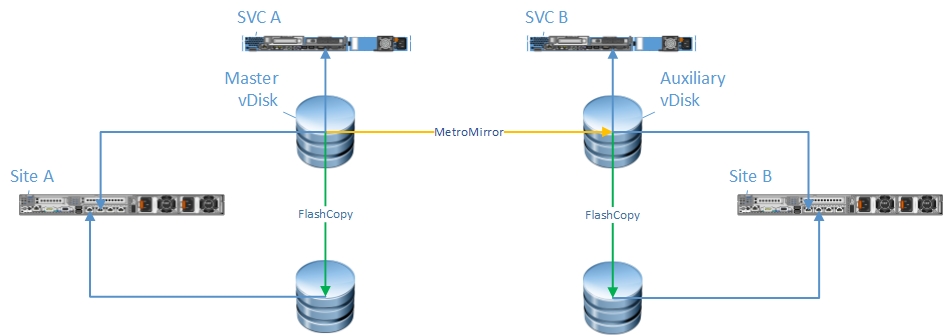
The following diagram represents the Pre-configured SRA environment:

SRM_1_New

One thing to keep an eye on is the FlashCopy(s), for both Master and Auxiliary vDisks. Details will be provided in the next section.

What does SRM provide?

SRM Test Process

SRM provides functionality to simulate protected virtual machine failover from protected site to recovery site. This is where the FlashCopy is involved; it does not impact Master or Auxiliary vDisk i.e. the actual protected virtual machine. Once the VMFS volume, the back-end storage being the FlashCopy, is presented and mounted on recovery site:

    • Dummy virtual machine(s) is registered
    • A dummy portgroup is created and assigned to the virtual machine
      • The dummy portgroup is a portgroup that doesn’t have any uplinks attached that duplicate IP address doesn’t have to be worried about.
    • The virtual machine is powered on.

Detailed steps (VMware and SVC) are shown below.

Protected Site

VMware SVC
None svctask startrcrelationship -force -primary master “Relation ID”

  • This is to ensure the relationship is started

Recovery Site

VMware SVC
Rescan all HBAs svctask prestartfcmap “FlashCopy Map ID”

  • Prepares a FlashCopy mapping so it could be started
Resolve VMFS volumes svctask startfcmap “FlashCopy Map ID”
Refresh host storage system  
Reconfigure virtual machine  
Add virtual switch  
Add port group  
Power on virtual machine  

 I won’t go through the cleanup process as it’s the reverse of the steps above.

SRM Recovery Process

This is where the actual game begins. This feature provides protected virtual machine(s) failover to recovery site (it involves in the actual Master and Auxiliary vDisks).

SRM provides two types of Recovery:

  1. Planned Migration
  2. Disaster Recovery

The only difference between these two is that planned migration will stop failover if SRM encounters any errors (sites must be connected and the replication must be available & up-to-date) whereas disaster recovery won’t. To explain it in more details, even if the relationship was broken and/or the data is not up-to-date, it will use the latest synced Auxiliary vDisk whereas planned migration will stop and thrown an error.

Detailed steps (VMware and SVC) are shown below. One thing to note is that the steps below are for Planned Migration. It will be different if the protected site faces complete outage i.e. power/storage outage. This is because the Master vDisk will be offline and relationship will be stopped soon as an outage happens.

Protected Site

VMware SVC
Power-off virtual machine(s) svctask startrcrelationship –force –primary master “Relation ID”
Un-register virtual machine(s)  
Un-mount VMFS volume(s)  
Detach SCSI LUN(s)  

 Recovery Site

VMware SVC
Rescan all HBAs svctask switchrcrelationship –primary aux “Relation ID”
Attach SCSI LUN svctask stoprcrelationship “Relation ID”
Resolve VMFS volumes svctask prestartfcmap “FlashCopy Map ID”
Refresh host storage system svctask startfcmap “FlashCopy Map ID”
Update virtual machine files  
Reload virtual machine from new configuration  
Reconfigure virtual machine  
Reload virtual machine  
Reconfigure virtual machine  
Power-On  

Re-protect

Now the original protected site became recovery site and vice versa. Re-protection will only be available if the recovery site is online, i.e. when the datacentre comes back online after a disaster. 

Re-protect makes sure the relationship is started and sync is up-to-date so that when a virtual machine fails over back to the original protected site, the latest copy is available.

This process also cleans-up the leftover at the old protected site, i.e. virtual machine, VMFS volumes.

Protected Site

VMware SVC
Delete file svctask startrcrelationship –force –primary aux “Relation ID”

Recovery Site

VMware SVC
Create virtual machine
Unregister virtual machine
Reload virtual machine from new configuration
Reconfigure virtual machine
Delete file
Reconfigure virtual machine
Delete state information for detached SCSI LUN
Delete state information for un-mounted VMFS volume
Rescan all HBAs
Refresh host storage system

Thoughts

SRM is a great automation tool that will reduce administrators’ workloads when disaster happens. Installation and configuration isn’t hard but documentation is. It will take most of the time to write solid documentation before creating protection groups and recovery plans (well some kind of manager will be writing it, right?). The list below is what needs to be documented:

    • Roles and User Groups
    • Protection Group(s)
    • Recovery Plan(s)
    • Dependencies
    • Customisation, e.g. scripts, IP address change
    • DR Testing

Another advantage is that based on the groups and permissions, the owners of the virtual machines could log-in to SRM and start disaster recovery that virtualisation administrators do not have to be involved in. This allows flexibility to the owners. However, there will be a lot of political games 🙂

One problem from business point of view is cost. As described above, FlashCopy(s) must be created for Master and Auxiliary vDisks. This means, to protect virtual machine(s), the owners need to pay for 4 x disk. For example, if the size of virtual machines is 256GB altogether he/she will need to pay for 1024GB. To improve this, I would suggest:

    • Create FlashCopy(s) with the cheapest storage
    • Configure with non-preconfigured environment

With non-preconfigured environment, a specific MDisk group will be used purely for FlashCopy(s) where the administrator could put cheapest storages in this MDisk groups. Also, non-preconfigured environment supports 3 volumes types:

    • Standard
    • Thin Provisioned/Space Efficient
    • Compressed Volume

Will need to do some more testing once a dedicated MDisk group is ready to see which one works best but I think thin provisioned will be the best choice. With these, possibly the cost can be reduced to 3 x disk. Another advantage for using dedicated MDisk group for FlashCopy(s) is that it won’t impact any production/test back-end storage while FlashCopy(s) is under copying.

Future

In future, I will be posting another blog on SRM vSphere Replication.

VMware vCenter Inventory Service Fails To Start 5.5

Introduction

Recently, due to a network issue, vCenter server was failed over from Primary to Secondary. vCenter Heartbeat was keep reporting warnings and as there was already an issue with vCenter Profile-Drive Storage service, thought the warnings were related to it. However, the next day, vCenter users were complaining that web-client wasn’t  operating. Checked the services on Windows where vCenter server 5.5 was installed and found that vCenter Inventory Service was stopped.

Log Analysis

Analysed the ds.log under C:\ProgramData\VMware\Infrastructure\Inventory Service\Logs\ and found a Fatal error message, attached below:

WrapperListener_start_runner  FATAL com.vmware.vim.dataservices.WrapperListenerImpl] Error starting service: 
org.springframework.beans.factory.BeanCreationException: Error creating bean with name 'instanceUUID' defined in class path resource [server/config/server-config.xml]: Cannot resolve reference to bean 'store' while setting bean property 'targetObject'; nested exception is org.springframework.beans.factory.BeanCreationException: Error creating bean with name 'storeFactory' defined in class path resource [server/config/query-server-config.xml]: Invocation of init method failed; nested exception is com.xhive.error.XhiveException: INTERNAL_ERROR: Corrupt log record at lsn 362168822267912, Original message: Page 2000054f02 in extent queue contains incorrect magic number
 at org.springframework.beans.factory.support.BeanDefinitionValueResolver.resolveReference(BeanDefinitionValueResolver.java:275)
 at org.springframework.beans.factory.support.BeanDefinitionValueResolver.resolveValueIfNecessary(BeanDefinitionValueResolver.java:104)
 at org.springframework.beans.factory.support.AbstractAutowireCapableBeanFactory.applyPropertyValues(AbstractAutowireCapableBeanFactory.java:1244)
 at org.springframework.beans.factory.support.AbstractAutowireCapableBeanFactory.populateBean(AbstractAutowireCapableBeanFactory.java:1008)
 at org.springframework.beans.factory.support.AbstractAutowireCapableBeanFactory.doCreateBean(AbstractAutowireCapableBeanFactory.java:470)
 at org.springframework.beans.factory.support.AbstractAutowireCapableBeanFactory$1.run(AbstractAutowireCapableBeanFactory.java:409)
 at java.security.AccessController.doPrivileged(Native Method)
 at org.springframework.beans.factory.support.AbstractAutowireCapableBeanFactory.createBean(AbstractAutowireCapableBeanFactory.java:380)
 at org.springframework.beans.factory.support.AbstractBeanFactory$1.getObject(AbstractBeanFactory.java:264)
 at org.springframework.beans.factory.support.DefaultSingletonBeanRegistry.getSingleton(DefaultSingletonBeanRegistry.java:220)
 at org.springframework.beans.factory.support.AbstractBeanFactory.doGetBean(AbstractBeanFactory.java:261)
 at org.springframework.beans.factory.support.AbstractBeanFactory.getBean(AbstractBeanFactory.java:185)
 at org.springframework.beans.factory.support.AbstractBeanFactory.getBean(AbstractBeanFactory.java:164)
 at org.springframework.beans.factory.support.DefaultListableBeanFactory.preInstantiateSingletons(DefaultListableBeanFactory.java:423)
 at org.springframework.context.support.AbstractApplicationContext.finishBeanFactoryInitialization(AbstractApplicationContext.java:729)
 at org.springframework.context.support.AbstractApplicationContext.refresh(AbstractApplicationContext.java:381)
 at org.springframework.context.support.ClassPathXmlApplicationContext.<init>(ClassPathXmlApplicationContext.java:139)
 at org.springframework.context.support.ClassPathXmlApplicationContext.<init>(ClassPathXmlApplicationContext.java:93)
 at com.vmware.vim.dataservices.DataService.getService(DataService.java:213)
 at com.vmware.vim.dataservices.WrapperListenerImpl.start(WrapperListenerImpl.java:52)
 at org.tanukisoftware.wrapper.WrapperManager$12.run(WrapperManager.java:3560)

Issues and Solution

Luckily, there was already an KB article regarding this issue http://kb.vmware.com/selfservice/microsites/search.do?language=en_US&cmd=displayKC&externalId=2017370. The issue was that the database for vCenter Inventory service was unusable or corrupted. To fix this, I had to either:

    • Restore the database from back-up
    • Reset the database

Since there was no back-up taken to restore the database, had to reset it. The steps of resetting vCenter Inventory Service database can be found here: http://kb.vmware.com/selfservice/microsites/search.do?cmd=displayKC&docType=kc&docTypeID=DT_KB_1_1&externalId=2042200

Followed steps and everything was smooth. However, faced an issue on running register-is.bat file. It thrown an error message that it cannot authenticate SSL certificate files. The error is attached below:

The SSL certificate of STS service was successfully verified against the list of client-trusted certificates SOAP fault javax.xml.ws.soap.SOAPFaultException: Invalid credentials
at com.sun.xml.internal.ws.fault.SOAP11Fault.getProtocolException(Unknow n Source)
at com.sun.xml.internal.ws.fault.SOAPFaultBuilder.createException(Unknow n Source)
at com.sun.xml.internal.ws.client.dispatch.DispatchImpl.doInvoke(Unknown Source)
at com.sun.xml.internal.ws.client.dispatch.DispatchImpl.invoke(Unknown S ource)
at com.vmware.vim.sso.client.impl.SoapBindingImpl.sendMessage(SoapBindin gImpl.java:131)
at com.vmware.vim.sso.client.impl.SoapBindingImpl.sendMessage(SoapBindin gImpl.java:82)
at com.vmware.vim.sso.client.impl.SecurityTokenServiceImpl$RequestRespon seProcessor.sendRequest(SecurityTokenServiceImpl.java:677) at com.vmware.vim.sso.client.impl.SecurityTokenServiceImpl$RequestRespon seProcessor.executeRoundtrip(SecurityTokenServiceImpl.java:611) at com.vmware.vim.sso.client.impl.SecurityTokenServiceImpl.acquireTokenB yCertificate(SecurityTokenServiceImpl.java:377)
at com.vmware.vim.dataservices.vcregtool.RegisterVC.acquireSamlToken(Reg isterVC.java:635)
at com.vmware.vim.dataservices.vcregtool.RegisterVC.register(RegisterVC. java:211)
at com.vmware.vim.dataservices.vcregtool.RegisterVC.doRegistration(Regis terVC.java:1253)
at com.vmware.vim.dataservices.vcregtool.RegisterVC.main(RegisterVC.java :1332) Creating SoapFault Processing fault: ns0:FailedAuthentication: Invalid credentials Provided credentials are not valid. opId=6eacd52b-fc8d-401b-bbda-08af92ec2e21 END operation Token request rejected by STS Service com.vmware.vim.sso.client.exception.AuthenticationFailedException: Provided cred entials are not valid.

Raised a ticket to VMware support and they modified a line on register-is.bat file. The modification is shown below in bold:

set COMMAND="%~dp0vcregtool.bat" -action register 
-vcurl %1 
-isurl %2 
-lookupserviceurl %3 -vccert "%DATA_DIR%\SSL\sso.crt" 
-vcprivkey "%DATA_DIR%\SSL\sso.key"
-vcinstancecfg "%DATA_DIR%\instance.cfg" -vcendpointsdir  "%PROGRAM_DIR%\endpoints" -vcextensionsdir "%PROGRAM_DIR%\extensions" -vcforceregister true

Ran register-is.bat file again and was successful.

Still not quite sure why he pointed to sso.crt and sso.key instead of rui.crt and rui.key. Probably this is the behaviour changed since vCenter server 5.5.

Summary

In summary, when vCenter Inventory Service stops functioning, first thing is to check the ds.log located under C:\ProgramData\VMware\Infrastructure\Inventory Service\Logs\. If the fatal error message is similar to the attached above, the root cause is that the database is corrupted or unusable. KB articles mentioned up this post explains the steps well but there is a file, register-is.bat to be tweaked. This seems to be the behaviour change and if so, KB article has to be updated accordingly.

Hope this helps to people who are facing issues with vCenter Inventory Service failing to start.